
We often use VPNs to keep our online activities private. We believe they encrypt our connection and hide our digital tracks. But, a small flaw can make this protection useless, letting your ISP see all your browsing history.
This issue is called a DNS leak. Even with a VPN on, your device might send DNS requests to your ISP, not the VPN’s secure tunnel. This leak shows your browsing history, location, and habits to your ISP.
For journalists, activists, and anyone who cares about privacy, this is a big problem. A DNS leak test is the only sure way to check if your connection is private. It’s not just about avoiding ads; it’s about protecting your right to digital privacy.
Key Takeaways
- DNS leaks can expose your entire browsing history to your ISP, even when using a VPN.
- A VPN is not a guarantee of privacy if a DNS leak is present.
- Journalists, activists, and everyday users are all at risk of exposure.
- Your ISP can see and log every website you visit if a leak occurs.
- Conducting a DNS leak test is a simple, essential step for anyone serious about online privacy.
- Your location and identity can be compromised through a DNS leak.
- Regular testing is the only way to ensure your privacy tools are working as intended.
1. The Invisible Threat: What Is a DNS Leak?
Every time you visit a website, you send a secret message. If this message leaks, it can reveal what you’re doing online. We often encrypt our web traffic, but the first request can slip through unnoticed. This is called a DNS leak, and it can undermine the privacy tools we use.
To understand this threat, we need to know how the internet’s directory works. We also need to know where protection systems fail. A reliable dns leak detection tool is key for finding these vulnerabilities before they harm your data.
1.1 DNS: The Phonebook of the Internet
The Domain Name System (DNS) translates website names into numbers that computers can understand. It’s like the internet’s universal phonebook. Without DNS, we’d have to remember numbers for every website.
When you type a website’s address, your device doesn’t know where to find it. It sends a DNS query to a resolver, usually your internet service provider. This resolver then searches through servers until it finds the correct number.
“DNS is one of the most fundamental yet overlooked components of internet privacy. Every query tells a story about user intent.”
The DNS system works well for connecting us to websites but raises privacy concerns. Your ISP’s DNS servers log these queries, creating a profile of your browsing habits. Even with privacy tools, the first request can still leak.
1.2 The Anatomy of a Leak: When DNS Requests Go Astray
A DNS leak happens when queries bypass their secure path. Instead of going through an encrypted VPN tunnel, they go directly to your ISP’s servers. This happens silently, often without any warning or error message.
Your device works normally, and websites load as expected. The leak is invisible unless you specifically test for it. That’s why using a dns leak detection tool regularly is important for privacy.
1.2.1 The Role of Your ISP in the DNS Process
Internet service providers usually assign their own DNS servers automatically. These servers handle all translation requests from devices on their network. While convenient, this gives ISPs complete visibility into your browsing destinations.
Even when you try to hide your activity, default settings may use these ISP servers. Network configurations, especially after reconnections or system updates, can override your privacy settings. The ISP’s DNS infrastructure becomes the unintended recipient of your queries.
1.2.2 How a VPN is Supposed to Protect Your Queries
A properly configured VPN creates an encrypted tunnel for all internet traffic. This includes DNS queries, which should route through the VPN provider’s private DNS servers. These servers don’t log your activity or associate it with your real IP address.
The VPN’s DNS protection should be automatic and seamless. When working correctly, your ISP sees only encrypted data to the VPN server, not your individual website requests. This separation is key to the privacy promise of VPN services.
| DNS Path Type | Query Route | Visibility | Privacy Status | Detection Method |
|---|---|---|---|---|
| Secure VPN Path | Device → VPN Tunnel → VPN DNS | VPN provider only | Protected | Shows VPN DNS servers only |
| ISP Default Path | Device → ISP DNS Server | Full ISP visibility | Exposed | Shows ISP servers clearly |
| Leaky Path | Device → ISP DNS (bypassing VPN) | Full ISP visibility despite VPN | Critical Failure | Mixed results showing both |
| Third-party Secure | Device → Encrypted DNS (DoH/DoT) | DNS provider only | Protected | Shows chosen secure resolver |
1.3 Why a DNS Leak is a Critical Privacy Failure
When DNS queries leak, they expose your browsing intentions before encryption begins. Your ISP gains a complete map of websites you visit, even while using a VPN. This defeats the primary purpose of privacy tools meant to obscure your digital trail.
The failure is particularly serious because it happens transparently. Your VPN connection might show as active, websites might load through encrypted channels, but the initial queries traveled unprotected. This creates a false sense of security while your activity remains exposed.
We consider this a critical failure because it undermines the fundamental privacy guarantee. A comprehensive dns leak detection tool helps identify these breaches before sensitive browsing occurs. Regular testing should become part of your digital hygiene routine.
Beyond ISP surveillance, leaked DNS data can expose you to additional risks. Malicious actors on your network might intercept these unencrypted queries. Government surveillance programs often monitor DNS traffic as part of broader data collection efforts.
2. How DNS Leaks Happen: A Technical Post-Mortem
When you ask for a website, your device sends a DNS request. Many think their VPN keeps all data safe. But, there are many ways DNS requests can leak to your ISP.
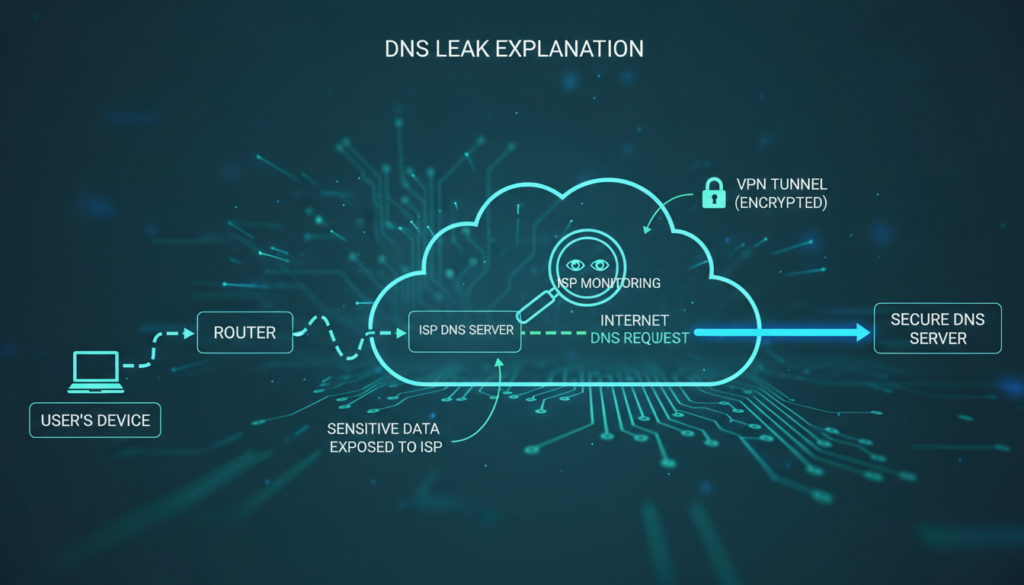
2.1 The Standard, Secure Path of a DNS Request
With a good VPN, your DNS request is safe. Your computer turns “example.com” into an IP address. This should never reach your ISP.
Here’s how it should work:
- You type a website address into your browser.
- Your device sends a DNS query to find the website.
- The VPN client catches this query before it goes to your default DNS.
- The query goes through the VPN tunnel to the VPN’s DNS server.
- The VPN’s DNS server gives back the IP address through the tunnel.
- Your browser connects to the website through the VPN.
In this perfect world, your ISP only sees encrypted traffic. They can’t see which sites you visit. A good VPN with DNS leak protection is key. Always test to make sure your DNS is safe.
2.2 Common Failure Points That Cause Leaks
The safe path depends on everything working right. But, many things can go wrong. These problems often go unnoticed until a test shows them.
2.2.1 VPN Configuration Failures and Kill Switches
Many leaks come from VPN setup mistakes. The kill switch is meant to block all internet if the VPN drops. But, not all kill switches work as they should.
Some only block app traffic, letting DNS queries through. Others react too slow, exposing you. We’ve seen DNS requests leak during VPN server changes or reconnects.
Setting up your VPN wrong is another problem. If your VPN client doesn’t change your DNS settings, leaks happen. Some VPNs need manual DNS setup. Skipping this step leaves you open to leaks.
2.2.2 IPv6 Leaks: The Stealthy Vulnerability
IPv6 is a sneaky leak point. Many VPNs and systems still use IPv4. Your device might use IPv6 for DNS queries, while your VPN only handles IPv4.
This creates a leak. The IPv6 DNS request goes to your ISP’s servers. Your VPN doesn’t even see it. This is a big privacy breach that standard tests might miss.
Modern systems often have IPv6 on by default. Unless your VPN supports and tunnels IPv6, these queries leak. That’s why you need to test for DNS leaks, including IPv6.
2.2.3 Operating System DNS Handling Quirks
Your computer’s OS adds more complexity. Systems like Windows 10/11, macOS, and Linux have their own DNS behaviors. Some features meant to be helpful can actually risk your privacy.
Windows has Smart Multi-Homed Name Resolution. It sends DNS queries to multiple servers at once. If one of those servers is your ISP’s, your query leaks.
macOS and some Linux distributions have similar quirks. They might cache DNS results or use fallback servers. These features can bypass your VPN’s DNS settings.
2.3 The Role of Transparent DNS Proxies and ISP Hijacking
Sometimes, the problem isn’t with you. Some ISPs use transparent DNS proxies. These systems catch and redirect DNS traffic, ignoring your device settings.
Here’s how it works. Your computer sends a DNS query to your VPN’s DNS. The ISP’s network equipment sees this as DNS traffic. It then redirects the query to the ISP’s DNS servers.
You get the right IP address, so it seems fine. But, your ISP now knows all your browsing history. Your VPN’s encryption doesn’t matter for DNS privacy.
This is common with:
- Mobile network providers
- Some cable internet providers
- Public Wi-Fi in airports and hotels
- Corporate networks with content filtering
Detecting ISP hijacking needs special tests. Regular DNS leak tests might not catch this. The query seems to come from your DNS server, but it actually went through the ISP’s proxy first.
Understanding these technical issues shows why DNS privacy needs many defenses. No single setting or tool can guarantee safety. Regular testing is your best defense against these hidden leaks.
3. The Real-World Consequences of a DNS Leak
When we talk about DNS leaks, we’re not just discussing technical issues. We’re talking about real threats to your privacy and security. A DNS leak can turn your private browsing into a public record.
3.1 Your ISP’s Unblinking Eye: Profiling and Data Collection
Your ISP keeps a record of every website you try to visit if there’s a DNS leak. This creates a detailed diary of your online activities. They know where you go, what you search for, and when.
This data paints a clear picture of your life. Visiting medical sites might show health concerns. Looking up financial sites could indicate your economic status. Streaming and shopping patterns reveal your hobbies and lifestyle.
3.1.1 How ISPs Use DNS Data to Build a Profile
ISPs use advanced analytics to turn DNS logs into detailed profiles. They categorize requests by type, frequency, and timing. This profiling happens automatically through data mining algorithms.
The resulting profile can include:
- Demographic information inferred from your browsing habits
- Interest categories for targeted advertising
- Health and financial sensitivity scores
- Behavioral patterns indicating work hours, sleep schedules, and routines
Some providers sell this data to third parties. Others use it internally for service optimization and marketing. This highlights why protecting DNS privacy is essential.
The profile grows more detailed with each leaked query. Over time, it becomes a digital fingerprint that uniquely identifies your online behavior. This surveillance happens silently in the background of your daily internet use.
3.2 Beyond the ISP: Risks from Hackers and Snoopers
While ISP monitoring is a concern, hackers pose a more immediate threat. Public Wi-Fi networks become hunting grounds when DNS requests leak. Hackers intercept these queries to map your online activity.
Unencrypted DNS traffic broadcasts your intentions across the network. Anyone with basic tools can see which sites you’re trying to reach. This creates opportunities for phishing, redirection, and exploitation.
3.2.1 Man-in-the-Middle Attacks on Unencrypted Queries
Attackers position themselves between your device and the DNS server. They intercept your requests and provide fraudulent responses. This technique redirects you to malicious sites that mimic legitimate ones.
The attack sequence typically follows this pattern:
- Your device sends a DNS query for your bank’s website
- The attacker intercepts this unencrypted request
- They respond with the IP address of a phishing site
- Your browser connects to the fake banking portal
- You enter login credentials, which the attacker captures
These attacks succeed because traditional DNS lacks encryption. The queries travel in plain text that anyone can read and manipulate. This vulnerability makes it crucial to protect dns privacy through encryption and proper configuration.
Beyond credential theft, attackers can inject malware or track your movements across the web. Each leaked query provides another data point for their surveillance. The risk increases dramatically on unsecured networks like coffee shop Wi-Fi.
3.3 The Failure of Censorship Circumvention and Geo-Spoofing
Many users use VPNs to bypass geographical restrictions or censorship. A DNS leak completely undermines this purpose. It reveals your true location despite the VPN tunnel.
Streaming services and government firewalls check your DNS resolver’s location. When requests leak to your local ISP’s servers, they see you’re accessing content from a restricted region. The service then blocks your connection or reports your actual location.
This failure occurs because:
- DNS requests bypass the VPN tunnel entirely
- Local network settings override VPN configurations
- Operating systems sometimes prefer faster local resolvers
- Transparent proxies intercept and redirect queries
The consequences extend beyond entertainment. Journalists, activists, and researchers rely on geo-spoofing for safety and access. A DNS leak can expose their real location to hostile entities. It can also reveal they’re accessing sensitive or forbidden information.
This location exposure demonstrates why partial privacy measures fail. Encrypting your web traffic means little if your DNS requests tell the true story. To truly protect dns privacy, you must secure the entire request chain from device to destination.
Each of these consequences connects to a broader truth: DNS leaks make privacy tools ineffective. They create gaps in your digital defenses that adversaries readily exploit. Addressing this vulnerability requires specific attention to DNS configuration alongside other security measures.
4. How to Perform a DNS Leak Test: A Step-by-Step Guide
To fix a DNS leak, first detect it with a test. This test shows if your browsing is private or not. We’ll show you how to do this test easily.
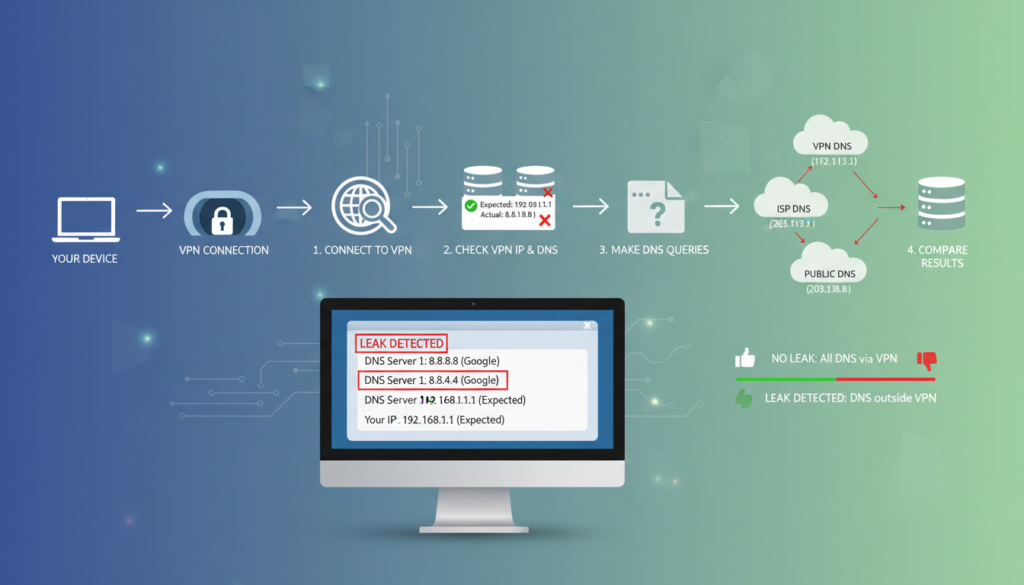
4.1 Why a DNS Leak Test is Your First Line of Defense
Your VPN might look secure, but DNS privacy is key. A DNS leak test checks your privacy setup. It’s like checking your digital locks before using them.
Many think their VPN does everything. But, this can leave security gaps. Testing proves your protection, not just trusting software.
4.1.1 What a DNS Leak Test Actually Checks
A DNS leak test doesn’t check your browsing history. It sees which DNS servers answer your website requests. The test website sends domain name queries and records the answers.
If your ISP’s servers answer instead of your VPN’s, you have a leak. It also checks for scattered requests across unsecured channels. This shows your internet traffic’s true path.
4.2 Step-by-Step: Conducting a Comprehensive DNS Leak Test
Follow these steps to test for DNS leaks. Each step builds on the last, showing your connection’s security.
4.2.1 Step 1: Baseline Test (Without VPN)
First, disconnect from your VPN. Visit a trusted DNS leak test site like DNSLeakTest.com or ipleak.net. Run the test and note the servers.
These will be your ISP’s servers. This is your “unprotected” baseline. Save these results for later. Knowing your ISP’s DNS servers helps you spot them during VPN testing.
4.2.2 Step 2: Connect to Your VPN
Next, connect to your VPN. Choose a server in a different country or region. Wait for the connection to establish—this takes 10-20 seconds. Don’t browse other sites during this time.
Some VPNs have DNS protection on by default. Others need manual activation. Check your VPN’s documentation if unsure. A good connection should use the VPN tunnel for all traffic.
4.2.3 Step 3: Using a Trusted DNS Leak Test Website
With your VPN on, go back to the DNS leak test site. Clear your browser cache if you can. Then, run the test again, using the same type as your baseline.
Trusted sites offer various test options. The extended test checks more domains for thorough detection. Avoid unknown test sites that might collect your data.
4.2.4 Step 4: Analyzing and Interpreting Your Results
Compare your VPN test results with your baseline. A good test shows DNS servers from your VPN server’s country, not your ISP’s. The server names should match your VPN provider.
If you see your ISP’s servers or your actual location’s servers, you have a DNS leak. Some tests show city and country data for each server. Check that these match your VPN server location. Seeing one familiar server among foreign ones means you have a partial leak.
4.3 Advanced Testing: Checking for IPv6 and WebRTC Leaks
Basic DNS leak tests might miss two big vulnerabilities. Older VPNs might not handle IPv6 properly, letting traffic bypass the VPN. WebRTC in browsers can also reveal your true IP address, despite VPN protection.
To test for IPv6 leaks, use sites like test-ipv6.com or ipleak.net’s IPv6 test. These check if IPv6 requests escape your VPN. For WebRTC, visit browserleaks.com/webrtc and see if your real IP shows up with your VPN IP.
These advanced tests complete your security check. They ensure no hidden channels compromise your privacy. Regular testing in DNS, IPv6, and WebRTC areas gives you full protection awareness.
5. Case Study: A Real-World DNS Leak in Action
This case study shows how a journalist’s privacy was compromised. Sarah Chen, a Chicago-based reporter, was working on a sensitive story. She used a VPN for privacy but found her security had a big flaw.

5.1 The Setup: A Journalist Working Remotely
Sarah Chen was researching a story that needed privacy. She worked from coffee shops and used a VPN for security. Her VPN had DNS leak protection and an automatic kill switch.
She tested her VPN regularly and got clean results. But, her setup had a hidden weakness.
Sarah worked from various places in the Midwest. She used a Windows 11 laptop with both IPv4 and IPv6 enabled. This setup was common but had a flaw.
5.2 The Leak: How a VPN’s “Kill Switch” Failed
The leak happened at a public library in Indianapolis. Sarah was accessing secure documents. The library’s Wi-Fi dropped, and her VPN took seconds to reconnect.
The VPN’s kill switch failed to block all traffic. It only blocked IPv4, leaving IPv6 open. Sarah’s computer sent DNS requests over IPv6, bypassing the VPN.
For 45 seconds, all her domain lookups were exposed. This was a big privacy breach.
5.2.1 Technical Analysis of the Leak Vector
The VPN’s kill switch didn’t work as expected. It only controlled the IPv4 interface. The IPv6 interface was left unmanaged.
When the VPN dropped, here’s what happened:
- The VPN client lost connection to its server
- The kill switch activated for IPv4 traffic only
- Windows continued using its default network configuration for IPv6
- DNS requests for research domains flowed through the IPv6 interface
- These requests reached Comcast’s DNS servers instead of the VPN’s private servers
This shows a common but often overlooked weakness. Many focus on IPv4, forgetting about dual-stack operations. The leak was due to incomplete protection, not malware or misconfiguration.
5.3 The Aftermath: Data Exposure and Corrective Actions
Sarah found the leak two days later. A DNS leak test showed her ISP’s servers, not just her VPN’s. The test confirmed the leak.
The exposed data included DNS lookups for:
- Secure document sharing platforms used for whistleblower communications
- Research databases containing corporate financial records
- Encrypted messaging services for source interviews
- Journalistic collaboration tools with project codenames
The exposed metadata was significant. Her ISP could see she was researching specific corporations. This could reveal her investigation’s focus and compromise sources.
Sarah took immediate action:
- She disabled IPv6 on her laptop’s network adapters
- She switched to a VPN provider with verified IPv6 leak protection
- She configured her firewall to block all non-VPN traffic
- She began using DNS-over-HTTPS as an additional layer
- She notified her editor and sources about the potential exposure
This case shows even security-aware people can be vulnerable. Sarah’s experience highlights the need for regular DNS leak testing and the limitations of kill switches.
Sarah’s story is a reminder of the importance of digital privacy. Her actions mirror the steps we recommend for protecting your online security. The real cost was not just data exposure but the time and effort to rebuild security.
6. How to Prevent DNS Leaks: A Proactive Defense Guide
Now that we know the risks and how to detect them, let’s build a strong defense. To prevent DNS leaks, we need to use the right tools and set them up correctly. This guide will show you how to protect yourself.
6.1 Choosing and Configuring a Leak-Proof VPN
Your first defense is a good Virtual Private Network. Not all VPNs protect against DNS leaks. Look for ones that offer DNS leak protection as a key feature. This ensures all DNS queries go through the VPN’s encrypted tunnel.
6.1.1 The Importance of a DNS Kill Switch and DNS Leak Protection
A DNS kill switch is your backup. It watches your VPN connection. If it drops, the kill switch blocks all internet traffic. This stops your real IP and DNS requests from being seen by your ISP.
6.2 Manual DNS Configuration for Maximum Security
If you want more control, manual configuration is the way to go. This method avoids your ISP’s DNS and your VPN’s, giving you full privacy control.
6.2.1 Configuring Your Router for Secure DNS
Changing your router’s DNS settings is a big step. By using a trusted DNS provider like Cloudflare, Google, or OpenDNS, you protect your whole network. Just log into your router and change the DNS server addresses to your chosen provider’s.
6.2.2 Implementing DNS-over-HTTPS (DoH) or DNS-over-TLS (DoT)
For top privacy, use encrypted DNS protocols. DNS-over-HTTPS (DoH) and DNS-over-TLS (DoT) encrypt your DNS queries. Most browsers and operating systems support these. Turning on DoH or DoT makes your DNS traffic as private as HTTPS web traffic.
6.3 System-Level Hardening
Don’t forget to secure your operating system and browser. These tweaks block common leak vectors.
6.3.1 Disabling IPv6 to Prevent Leaks
IPv6 can cause DNS leaks. Many VPNs and privacy tools are still IPv4-focused. If your setup doesn’t fully support IPv6, your device might send DNS requests over IPv6. Disabling IPv6 on your network adapter is a simple fix. It forces all traffic, including DNS, to use IPv4, which VPNs and encrypted DNS services support.
6.3.2 Browser Hardening: Blocking WebRTC and Other Leak Vectors
Your web browser can leak information. WebRTC, for example, can reveal your real IP address even with a VPN. To protect your browser:
- Install a reputable WebRTC leak prevention extension or disable WebRTC in your browser’s flags.
- Use a privacy-focused browser like Firefox or a hardened version of Chromium.
- Disable WebRTC in your browser’s settings or flags (e.g., in Chrome, set `#disable-webrtc` in `chrome://flags`).
This is a strong DNS leak blocker at the application level.
| Defense Layer | Tool/Method | Key Benefit | Difficulty |
|---|---|---|---|
| VPN with DNS Protection | Paid VPN with DNS Kill Switch | Forces all DNS queries through encrypted tunnel | Easy |
| Router-Level DNS | Router DNS Settings | Network-wide protection for all devices | Moderate |
| Encrypted DNS | DoH/DoT in Browser/OS | Encrypts DNS queries end-to-end | Easy |
| System Hardening | Disable IPv6/WebRTC | Plugs OS-level leak vectors | Moderate |
Using a secure VPN, encrypted DNS, and hardening your system creates a strong defense. Start with a reliable VPN that has a no-logs policy and a DNS kill switch. Then, use a trusted, encrypted DNS service on your router or device. This multi-layered approach is the best way to prevent DNS leaks and keep your browsing private.
7. Essential Tools and Software for DNS Security
Keeping your DNS secure is key to protecting your online identity. Knowing about DNS leaks is just the start. The next step is to use the right tools. Here, we list resources and software to test for and prevent DNS leaks, keeping your DNS queries private.
7.1 DNS Leak Test Tools and Their Limitations
To fix a problem, you first need to find it. Many websites offer free DNS leak tests. These tools send DNS requests and show which server handled them. Sites like DNSLeakTest.com and ExpressVPN’s test are great for a quick check.
But, these tests have limits. A single test only shows one moment in time. Your network or VPN settings can change, causing new leaks. A clean test today doesn’t mean you’re safe tomorrow. Most tests only check IPv4, missing IPv6 leaks.
7.2 VPNs with Built-in DNS Leak Protection
Not all VPNs protect your DNS well. A good VPN with strong leak protection is your best defense. When picking a VPN, check its DNS handling, not just its “no-logs” policy.
7.2.1 Key Features: DNS Servers, Kill Switches, and Obfuscation
A great VPN for DNS security has certain features. It should have private, no-log DNS servers for your queries. It must also have a kill switch to block traffic if the VPN drops. Look for DNS leak protection and obfuscation features, too.
7.3 Standalone DNS Privacy Tools and Software
For those not using a VPN or wanting extra security, standalone tools are key. You can manually set your device to use a secure DNS resolver. Services like Cloudflare (1.1.1.1), Google Public DNS, and Quad9 offer encrypted DNS.
For advanced users, tools like Simple DNSCrypt or dnscrypt-proxy encrypt DNS traffic. You can also set your firewall to block DNS traffic to all but your chosen secure provider. This multi-layered defense, with a VPN and encrypted DNS, is very secure.
8. Legal and Privacy Implications of DNS Data
While using VPNs and encrypted DNS is key, knowing the legal side of DNS data is also crucial. It’s important to understand what your ISP can do with your data, how long they keep it, and how laws are changing. This section will explain the rules that affect your DNS data.
8.1 What Your ISP Can (and Can’t) Do With Your DNS Data
In the U.S., your ISP can collect, use, and sell certain data. They can see every website domain you try to visit. They can’t see the full URL of a specific page, but they can build a detailed profile of your internet habits.
ISPs can legally collect and analyze DNS data for many purposes. They can use it for network management and sell it to advertisers. They can also give this data to law enforcement with a valid warrant. Most ISP privacy policies let them collect and monetize your browsing data. This is why DNS leaks are so critical—they send your data to your ISP, who can legally profit from it.
8.2 Data Retention Laws and Your Privacy
Once your ISP has your DNS query data, the next question is: how long do they keep it? This is governed by data retention laws and internal policies, which vary a lot. In the U.S., there is no federal law that mandates a specific retention period for DNS or general internet traffic data. However, ISPs often retain this data for their own business purposes, and many will comply with law enforcement data requests.
Other regions have stricter rules. The European Union’s General Data Protection Regulation (GDPR), for instance, imposes strict limits on how long data can be kept and for what purpose. In the U.S., some states are enacting their own privacy laws. The key point is that without a legal mandate to delete it, your DNS query history could be sitting on a server for years, part of a profile that can be used for targeted advertising or sold to data brokers.
| Jurisdiction | Key Data Retention Law | Typical Retention Period for Connection Logs | Impact on DNS Data |
|---|---|---|---|
| United States (Federal) | No federal data retention law for ISPs | Varies by ISP policy (often 6 months to 2 years) | ISPs have broad discretion to collect and monetize DNS and browsing data. |
| European Union | GDPR, ePrivacy Directive | Minimization principle; no longer than necessary | Strict purpose limitation; explicit consent often required for processing. |
| California, USA | California Consumer Privacy Act (CCPA) | As specified in privacy policy; users can request deletion. | Consumers have the right to know what data is collected and can opt-out of sale. |
8.3 The Future: Encrypted DNS and Evolving Privacy Laws
The landscape is changing, with technology and law in a constant push-and-pull. The rise of DNS over HTTPS (DoH) and DNS over TLS (DoT) encrypts your DNS queries, preventing your ISP from easily reading them. This is a major step for privacy, making DNS leaks less damaging.
However, this shift is sparking legal and regulatory debates. Some ISPs and government bodies argue that encrypted DNS hampers network security and law enforcement investigations. The future will likely see a tug-of-war between privacy advocates pushing for default encryption and authorities concerned about “going dark.” New privacy laws, like the California Privacy Rights Act (CPRA), are giving consumers more control, forcing companies to be transparent about data collection. The technical fix of encrypted DNS is thus colliding with an evolving legal framework, moving us toward a future where your DNS queries are your business alone.
Ultimately, the law is slowly catching up with technology. While tools like VPNs and encrypted DNS provide a technical shield, comprehensive federal privacy legislation in the U.S. would provide a legal backstop, clearly defining and limiting how DNS and other personal data can be used.
9. Conclusion: Securing Your Digital Trail in a Leak-Prone World
A DNS leak is a big problem for your online privacy. It lets your ISP see your browsing history, even with a VPN. Companies like Comcast, AT&T, and Verizon can still track you.
These leaks happen due to wrong settings or VPN issues. They lead to data tracking and can’t hide your location. Tools like DNSLeakTest.com can spot these problems.
To stay safe, you need to act fast and use multiple layers of protection. Regularly test for DNS leaks. Pick VPNs like NordVPN or ExpressVPN that protect your DNS. Also, set your DNS to use secure servers from Cloudflare or Quad9.
Your online history is a big part of who you are online. Knowing about DNS leaks helps you control your privacy. By taking these steps, you can keep your browsing private.
The world of online tracking is always changing. Keep up with new encrypted DNS methods like DNS-over-HTTPS. Stay private by being careful and using the right tools. Your secure connection begins with fixing the DNS layer.
FAQ
What is a DNS leak, and why is it a privacy risk?
A DNS leak happens when your device sends DNS requests outside your VPN. This means your ISP can see all your browsing, even with a VPN. It’s a big privacy issue because it breaks the VPN’s purpose of keeping your online activities private.
How can I test if my VPN is leaking my DNS requests?
To check for DNS leaks, use a trusted test tool. Run the test while connected to your VPN. If you see your ISP’s DNS servers instead of your VPN’s, you have a leak. This is key to making sure your VPN is working right.
What are the most common causes of a DNS leak?
Common causes include a VPN’s “kill switch” not working, a misconfigured VPN client, or an OS using its own DNS. IPv6 leaks are also a big problem. Your ISP’s DNS proxies can also cause leaks.
What’s the difference between a DNS leak and a WebRTC leak?
DNS leaks reveal websites you visit. WebRTC leaks show your real IP address, even with a VPN. Both are serious issues. A good DNS leak test should also check for WebRTC leaks.
My VPN has DNS leak protection. Am I safe?
Having DNS leak protection is good, but it’s not enough. Even trusted VPNs can have issues. Always test for DNS leaks and IPv6 leaks to be sure.
How can I prevent DNS leaks for good?
To stop DNS leaks, use a VPN with a DNS kill switch and leak protection. Set your device’s DNS settings to a secure service. Disable IPv6 if your VPN doesn’t support it. Use a browser with WebRTC leak protection. Test regularly.
My ISP provides its own DNS servers. Is that a problem?
Yes, it’s a big problem. Your ISP’s DNS servers can log all your browsing, even with a VPN. Use a third-party DNS provider or your VPN’s DNS servers to protect your privacy.
What should I do if my DNS leak test shows a leak?
If you find a leak, don’t worry. First, check your VPN connection and settings. Then, try these steps:
- Reconnect to a different VPN server. Sometimes a simple reconnect fixes the issue.
- Check your VPN’s advanced settings. Make sure DNS leak protection is on.
- Disable IPv6 on your device’s network adapter if your VPN doesn’t support it.
- Manually set your DNS servers to a secure provider and disable automatic DNS assignment.
- Contact your VPN’s support. A persistent leak means there’s a problem with your VPN.
Find a way to fix the leak that works for you. It might involve changing your VPN settings or making system changes.
Leave a Reply